

Deleting apps at random isn’t a speed strategy. It can remove useful features while leaving the real bottleneck untouched. Effective Shopify speed optimization Hong Kong starts with evidence: identify what’s slowing product and collection pages, then prioritize fixes that protect the shopping experience and support sales.
If mobile shoppers have to wait, hesitate, or struggle to interact with your store, even a polished design can lose momentum. Faster doesn’t have to mean stripped back. The goal is to improve performance without breaking features customers rely on or weakening the journey from product discovery to checkout.
This practical guide shows you how to pinpoint delays caused by apps, scripts, images, and theme elements; rank potential changes by user impact, effort, and business importance; and validate results with meaningful performance checks. You’ll also learn how to connect speed improvements to customer experience and conversion analysis, so every change has a clear reason behind it. The result is a measured approach to building a faster Shopify storefront for Hong Kong customers.
Key Takeaways
- Shopify speed optimization Hong Kong works best when you identify the storefront elements causing delays before making changes.
- Compare real-visitor data with controlled tests to understand both everyday performance and specific technical bottlenecks.
- Prioritize image sizing, formats, and loading behavior on key templates, while weighing potential gains against effort and functionality risk.
- Roll out improvements one change at a time, test the shopping journey, and measure technical metrics alongside add-to-cart and conversion data.
- Connect speed priorities with ecommerce web design, SEO, and conversion analysis to improve performance without losing sight of business goals.
Why Shopify Speed Optimization Matters for Hong Kong Stores
A store can appear to load and still feel slow. Shoppers notice when the main product image takes too long to appear, buttons don’t respond promptly, or page elements jump while they’re trying to tap. Shopify speed optimization Hong Kong should focus on these real storefront experiences, not a single score or an assumed performance benchmark.
Shopify speed optimization, in plain language: Improving how quickly a store’s important content appears, how smoothly shoppers can interact with it, and how steadily the page behaves as it loads.
Shopify provides the platform and hosting foundation, but merchants shape much of the storefront experience through theme choices, images and videos, apps, and external scripts. These elements can add work to a page or affect how quickly it responds. The aim isn’t to remove features blindly. Identify which elements create friction, then assess whether their value justifies their performance cost. This is part of broader web performance optimization.
Which parts of a Shopify store feel slow to shoppers?
Three experiences matter: initial visual loading, responsiveness, and layout stability. A collection page might show its heading quickly but take longer to display product images. A product page might look ready while its variant selector or add-to-cart button responds slowly. A landing page may shift as fonts, banners, or other elements load. Assess each template separately because each serves a different shopper task.
A fast homepage proves only that the homepage performed well under the conditions tested. It doesn’t show whether shoppers can browse a collection smoothly, evaluate a product without interruptions, or add it to the cart without delay. Check the pages customers actually enter and use, including pages reached through campaigns, search, and direct links.
Why speed and conversion quality belong in the same discussion
Performance affects the flow of shopping, not just the time until a page appears. Delays during browsing can interrupt product discovery. Sluggish interactions can make product evaluation harder, while friction around add-to-cart or checkout can disrupt purchase intent. Assess these moments separately, since improving one page doesn’t automatically resolve problems elsewhere.
Speed reduces technical friction; conversion quality depends on whether the entire shopping journey helps customers move forward. Faster metrics don’t guarantee a specific sales result. Product relevance, pricing, trust, usability, and checkout experience also shape outcomes. For Hong Kong stores, test actual local customer journeys across key templates and devices rather than assuming broad market or platform benchmarks represent every shopper’s experience.
How to Diagnose Shopify Speed Problems Before Changing the Store
Start with evidence, not edits. A reliable diagnostic workflow shows which pages and devices struggle, whether an issue affects real shoppers or appears only under test conditions, and which suspected causes deserve attention first. For Shopify speed optimization Hong Kong, use your own customer journeys to set priorities instead of assuming a generic benchmark reflects local store performance.
Which Shopify pages and devices should you test first?
Choose a representative homepage, collection page, product page, and key landing page. Use available analytics to identify the devices and entry pages Hong Kong customers actually use. The International Trade Administration’s overview of the Hong Kong e-commerce market offers broader context, but your store’s own data should guide the audit.
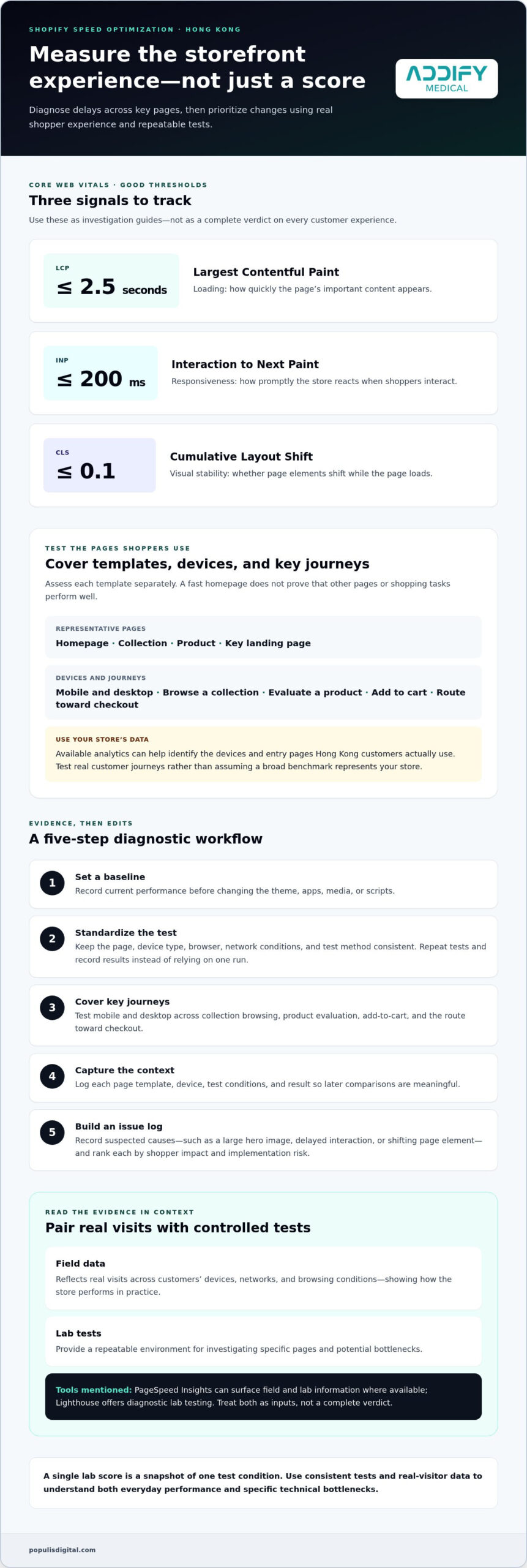
- 1. Set a baseline. Record current performance before changing the theme, apps, media, or scripts.
- 2. Standardize the test. Keep the page, device type, browser, network conditions, and test method consistent. Repeat tests and record the results instead of relying on one run.
- 3. Cover key journeys. Test mobile and desktop, including collection browsing, product evaluation, add-to-cart, and the route toward checkout.
- 4. Capture the context. Log each page template, device, test conditions, and result so later comparisons are meaningful.
- 5. Build an issue log. Record suspected causes, such as a large hero image, delayed interaction, or shifting page element. Rank each by shopper impact and implementation risk before making changes.
How to interpret Shopify and browser performance data
Use both field data and lab tests. Field data reflects real visits across customers’ devices, networks, and browsing conditions, showing how the store performs in practice. Controlled lab tests provide a repeatable environment for investigating specific pages and potential bottlenecks. PageSpeed Insights can surface field and lab information where available, while Lighthouse offers diagnostic lab testing. Treat both as inputs, not a complete verdict.
Track the Core Web Vitals: Largest Contentful Paint (LCP) for loading, Interaction to Next Paint (INP) for responsiveness, and Cumulative Layout Shift (CLS) for visual stability. Current “Good” thresholds are LCP at 2.5 seconds or less, INP at 200 milliseconds or less, and CLS at 0.1 or less. A useful score points to what to investigate, but it doesn’t explain every cause or every customer experience.
A single lab score is a snapshot of one test condition, not a verdict on how every visitor experiences your store. Compare repeatable tests with available field data, then prioritize issues affecting important Hong Kong customer journeys. For a broader storefront and conversion plan, see ecommerce web design and conversion strategy.
Which Shopify Speed Fixes Deliver the Best Balance of Impact and Risk?
Prioritize fixes by the delay they may remove, the effort involved, and what could break if a feature changes. Shopify manages the platform infrastructure, so merchants have limited control over server-level settings. The practical focus is the storefront: media, theme implementation, apps, and external scripts. For Shopify speed optimization Hong Kong, target the templates and customer journeys your diagnosis showed need attention, then validate each change before moving on.
| Potential fix | Likely impact | Effort | Functionality risk | How to validate |
|---|---|---|---|---|
| Resize oversized images and use suitable formats | High when large images delay key content | Low to medium | Low, if image quality and display dimensions are preserved | Compare loading metrics and check image clarity on mobile and desktop |
| Adjust nonessential media loading | Medium to high when below-the-fold media competes with visible content | Medium | Medium, if media appears late or fails to load as expected | Test scrolling, image display, and key content loading on representative templates |
| Review apps and overlapping scripts | Varies, depending on the scripts and pages affected | Medium | Medium to high if an app supports an important shopper or operational task | Test the app’s full customer journey and compare repeat performance results |
| Audit theme customizations and third-party tags | Varies; duplication or unnecessary execution may add overhead | Medium to high | High if code changes affect layout, tracking, or interactions | Use a controlled test, then check page rendering, events, and key actions |
How to reduce image, theme, and script overhead
Start with product and collection imagery. Match image dimensions to their display size, choose an appropriate format, and avoid loading nonessential media before shoppers need it. Review custom theme code and external tags for duplicate functions or scripts running on pages where they add no value. Test changes in a staging environment or controlled setup before publishing to the live store. Don’t make untested code edits just to chase a better score.
When should you keep an app instead of removing it?
Map every app to the customer or operational job it supports, such as reviews, search, or merchandising. Then assess its page impact and whether its settings or script-loading options can reduce unnecessary work. Where suitable, compare that function with existing theme capabilities, but don’t remove an app solely because it appears in a diagnostic report. Preserve essential features, change one element at a time, and retest the complete journey it supports, including add-to-cart or checkout where relevant.
The strongest fix isn’t always the most aggressive one. Choose changes that reduce real shopper friction while protecting the features that help customers browse and buy.
How to Implement and Measure Shopify Speed Improvements in Hong Kong
A speed change is valuable only if it improves the experience without disrupting shopping or obscuring what drove the result. Use a controlled rollout: establish a baseline, make a focused change, verify the customer journey, then measure again. This makes Shopify speed optimization Hong Kong a practical improvement cycle, not a one-off score chase.
How to run a safe Shopify speed optimization release
Before editing a live theme, save a recoverable version and document the proposed change, affected templates, and expected effect. Where possible, test in a staging environment or other controlled setup first. Keep changes isolated. If you resize images, adjust a script, and modify theme code at once, you won’t know which change affected performance or functionality.
After each change, run quality assurance on the relevant mobile and desktop journeys. Check navigation, product options, add-to-cart, cart behavior, and checkout handoffs. For Hong Kong storefronts, verify localized content, currency presentation, and purchase flows as customers experience them. A page that loads faster but displays the wrong market details or interrupts a key action isn’t an improvement.
What to measure after optimization
Compare post-release results with the recorded baseline using like-for-like pages, devices, test conditions, and time periods. Review page-level test results and Core Web Vitals, including Largest Contentful Paint, Interaction to Next Paint, and Cumulative Layout Shift. Repeat measurements instead of relying on a single test. Where field data is available, account for the fact that real visitors use different devices and network conditions.
Then look beyond technical performance. Track relevant funnel events such as product views, add-to-cart, checkout progression, and completed purchases. Compare periods with similar traffic sources and campaign activity, and note promotions, merchandising changes, or other factors that could influence results. Speed can reduce friction, but it doesn’t explain every movement in conversion data. See this conversion rate optimization guidance for ways to connect storefront experience with business metrics.
A reliable before-and-after comparison keeps the page, device, test conditions, and measurement window consistent, then checks both performance and the shopping funnel. That discipline helps separate a real improvement from normal variation and gives the next optimization a stronger evidence base.
A data-led ecommerce improvement strategy can connect storefront performance with customer journeys.
Choosing Shopify Speed Optimization Support in Hong Kong
Effective Shopify speed work needs more than a list of technical fixes. It should connect storefront performance to how customers discover products, evaluate them, and complete a purchase. For Shopify speed optimization Hong Kong, look for a clear process that starts with your store’s actual customer journeys and treats speed as part of the wider ecommerce experience.
What should a practical optimization engagement cover?
A focused engagement should move from diagnosis to implementation in a deliberate sequence. The scope should make clear what will be reviewed, which changes take priority, how functionality will be protected, and how results will be reported.
- Diagnosis: Review representative store pages, customer journeys, performance data, and potential storefront bottlenecks.
- Prioritization: Rank fixes by user impact, implementation effort, functionality risk, and relevance to merchandising and business goals.
- Implementation: Make targeted changes to appropriate storefront elements, documenting what changed and why.
- Quality assurance: Test key templates and customer actions, including navigation, product selection, cart behavior, and checkout handoffs.
- Reporting: Compare results with the baseline, record limitations or trade-offs, and identify sensible next steps.
This structure keeps decisions transparent. For example, reducing media overhead on a collection page may be a strong priority if it delays product discovery, while removing an app without understanding its role could harm merchandising or operations. Store design matters too. Ecommerce web design in Hong Kong can frame performance within the broader experience, from page structure to product presentation.
How Populis Digital connects storefront performance to growth
Speed priorities become clearer when design, SEO, and conversion analysis work together. Ecommerce web design considers how page layouts and features serve the shopping journey. SEO planning considers how customers reach relevant pages and how those pages support discovery. Conversion optimization examines where shoppers progress or encounter friction. These disciplines can help identify which technical changes deserve attention, without treating a faster score as a promise of higher rankings or sales.
Populis Digital is a Hong Kong-based digital agency that uses data-led analysis to connect website performance with customer acquisition and conversion. Its web design, SEO, and conversion rate optimization services bring storefront experience and business objectives into the same decision-making process. Ecommerce SEO planning can also align organic search with store priorities.
For a data-led approach to ecommerce web design and conversion strategy, visit Populis Digital.
Turn Store Speed into a Smarter Growth Priority
Faster Shopify performance doesn’t come from removing features at random. It comes from diagnosing the pages and customer journeys that need attention, prioritizing fixes by impact and risk, then validating each change against technical measures and store outcomes.
For Shopify speed optimization Hong Kong, keep the focus on your actual customers: test the devices and storefront flows they use, protect essential functionality, and compare results under consistent conditions. Speed is one part of a stronger ecommerce experience, alongside thoughtful design, discoverability, and conversion analysis.
Populis Digital is a Hong Kong-based agency serving businesses across multiple industries. Its ecommerce web design, SEO, and conversion rate optimization capabilities bring storefront experience and growth priorities into the same data-led conversation.
Frequently Asked Questions
How can I improve the speed of my Shopify store?
Start by testing representative product, collection, homepage, and landing pages on the devices your customers use. Identify bottlenecks before changing anything, then prioritize fixes such as resizing oversized images, adjusting nonessential media loading, and reviewing app or third-party scripts. Make one change at a time, check key shopping actions, and compare results with your baseline. A measured approach to Shopify speed optimization Hong Kong targets friction without removing features customers rely on.
Why is my Shopify store slow on mobile?
Mobile delays can come from large images, theme elements, apps, or external scripts that add work to the page or slow interactions. Network conditions and device capabilities also vary between visitors, so a desktop test may not reveal the same issues shoppers experience on phones. Test key templates on mobile, review real-visitor data where available, and check whether product content, menus, variant selectors, and cart actions load and respond as expected.
Do Shopify apps slow down a store?
Some apps can affect storefront performance, depending on the scripts they add, how those scripts load, and which pages use them. That doesn’t mean every app should be removed. First map each app to the customer or operational function it supports, then review its settings and performance impact. If you test disabling or replacing an app, verify the feature still works and retest the customer journey it supports before making the change permanent.
Does Shopify speed affect SEO and conversions?
Store speed can shape how smoothly people browse and interact with pages, while performance is also relevant to search visibility. Faster technical metrics don’t guarantee higher rankings or sales. Product relevance, page quality, usability, pricing, and trust also influence results. Track performance alongside organic search data and funnel actions such as add-to-cart and checkout progression to understand how technical changes relate to the wider customer experience.
How do I test Shopify store speed accurately?
Test representative page types on mobile and desktop, and keep conditions consistent so results are comparable. Use PageSpeed Insights and Lighthouse as diagnostic tools, not as the full verdict. Lab tests help investigate a page under controlled conditions; field data, when available, reflects real visitor experiences. Record Largest Contentful Paint, Interaction to Next Paint, and Cumulative Layout Shift, repeat tests, and compare them with your baseline.
Can I improve Shopify speed without changing my theme?
Yes. You can often investigate image dimensions and formats, media loading behavior, app settings, and third-party scripts without replacing your theme. Start with the issues most likely to affect important pages, and test each change before publishing it. Some fixes may require theme-level adjustments, but a redesign isn’t necessarily the first step. Preserve a recoverable version and check navigation, product options, cart behavior, and checkout handoffs after changes.
How often should I check my Shopify store speed?
Check performance when you make meaningful storefront changes, such as adding or removing apps, updating theme elements, changing media, or adding external scripts. Review it periodically as part of ongoing store maintenance, especially for key product and collection templates. Compare like-for-like pages and devices, and note releases or campaign changes that could affect results. Choose a cadence that fits your store’s update frequency and customer activity.
Should a Hong Kong Shopify store optimize for mobile first?
Prioritize mobile if your store analytics show that Hong Kong customers commonly discover products or shop on phones. Mobile-first testing helps surface issues with image loading, navigation, product selection, and cart interactions on the devices those customers actually use. Don’t ignore desktop, though. Review both experiences, then allocate effort according to traffic, customer journeys, and business importance. Your own store data is a stronger guide than assumptions about which device every shopper prefers.
Ready to connect your Shopify storefront experience with a focused growth plan? Talk to Populis Digital.